
Microsoft updates the printing platform for Windows 11 and Windows Server 2025. This change ends the distribution of V3 and V4 printer drivers through Windows Update. Microsoft announced the plan in September 2023. The transition occurs in stages over several years.
The company aims to modernise the printing experience for users. It shifts focus to the Microsoft Internet Printing Protocol Class Driver. This driver supports devices with Mopria certification. This move removes the requirement for manufacturers to provide specific installers.
Timeline for Driver Distribution Changes
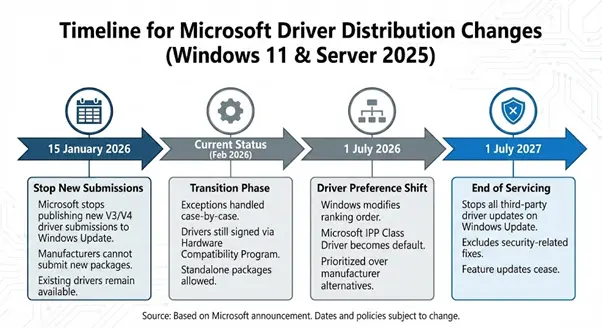
Microsoft sets the first milestone for 15 January 2026. On this date, the company stops publishing driver submissions to Windows Update. This policy applies to Windows 11 and Windows Server 2025. Manufacturers can no longer submit driver packages for these versions.
The company handles exceptions on a case-by-case basis. Current drivers on Windows Update remain available for installation. Microsoft continues to sign drivers through the Windows Hardware Compatibility Program. Manufacturers can still distribute drivers as standalone packages.
Timeline for Driver Distribution Changes
Shift in Driver Preference
A second milestone occurs on 1 July 2026. Windows modifies the ranking order for printer drivers. The system chooses the Microsoft IPP Class Driver by default. This preference takes priority when a user adds a device.
The change affects the Add Printer Wizard and the Settings menu. Windows prioritises the class driver over manufacturer alternatives. This ensures a consistent experience across different hardware models. Users can still select specific drivers manually if needed.
End of Servicing for V3 and V4 Models
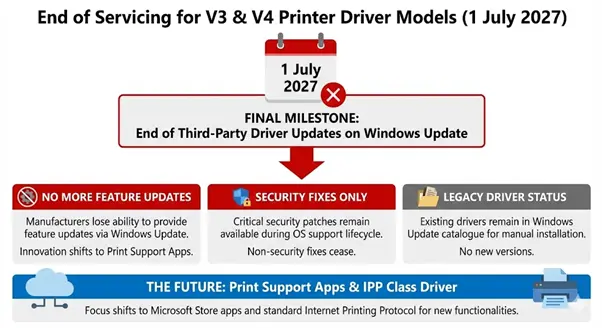
Microsoft schedules the final stage for 1 July 2027. The company stops all updates for third-party drivers on Windows Update. This restriction excludes security-related fixes. Security patches remain available during the support lifecycle of the operating system.
Manufacturers lose the ability to provide feature updates through this channel. Existing drivers remain in the Windows Update catalogue. Users can still install these drivers on their machines. The policy encourages the adoption of the IPP standard.
End of Servicing for V3 and V4 Models
Impact on Printing Technology
- Windows includes the Microsoft IPP Class Driver in the operating system.
- The driver works with printers that follow Mopria standards.
- This architecture supports connections via network, USB, and Bluetooth.
- Users do not need to download additional software for basic printing.
The system relies on the Internet Printing Protocol for communication. This protocol standardises how devices exchange data. It simplifies the setup process for millions of consumers. Most printers built after 2010 already support these requirements.
Security Enhancements for Windows Users
Microsoft improves system security through this transition. Legacy drivers often run with SYSTEM privileges. This level of access creates vulnerabilities for the operating system. The PrintNightmare exploit highlighted risks in the traditional spooler service.
The class driver architecture reduces the attack surface. It moves customisation to the Print Support App framework. These apps run in a sandbox environment. This approach prevents drivers from compromising the core system.
Introduction of Print Support Apps
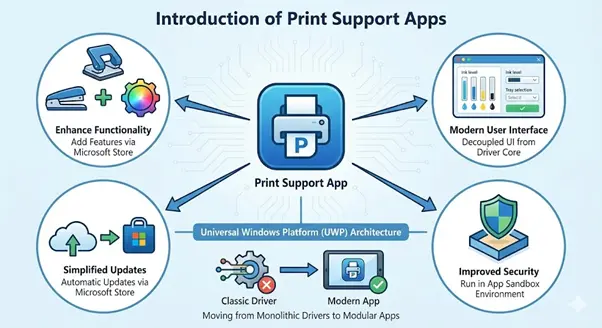
Manufacturers now use Print Support Apps to add features. These apps appear in the Microsoft Store. The system installs the app automatically when it detects a printer. This software provides access to tray selection and ink levels.
- Apps built on the Universal Windows Platform enhance reliability.
- The framework decouples UI elements from the driver core.
- Manufacturers avoid rebuilding software for every Windows version.
- Users receive updates through the Microsoft Store infrastructure.
Introduction of Print Support Apps
Hardware Compatibility and Lifecycle
The policy change affects hardware from various eras. Printers manufactured before 2010 might lack IPP support. These devices depend on the V3 or V4 driver models. Microsoft recommends that users contact manufacturers for driver updates.
The company does not disable existing features in the print platform. Users can still use older hardware with standalone drivers. This ensures that devices continue to function. The plan focuses on distribution rather than forced obsolescence.
Support for Specialised Hardware
Some industries require specific driver functionalities. Labelling machines and medical printers often use custom drivers. Microsoft continues to support these devices through manual installation. Manufacturers can sign drivers for Windows 10 without these restrictions.
The case-by-case approval process allows for critical exceptions. Microsoft reviews submissions that lack Mopria certification. This provides a path for specialised equipment. The company maintains the Windows Hardware Compatibility Program for validation.
Windows Protected Print Mode
Microsoft introduced Windows Protected Print Mode in recent updates. This feature works with Windows 11 version 24H2. It restricts printing to the class driver exclusively. The mode increases protection against malicious print jobs.
Users can enable this feature to harden their systems. It removes third-party binaries from the printing process. This represents the long-term vision for Windows security. The company encourages a transition to this protected environment.
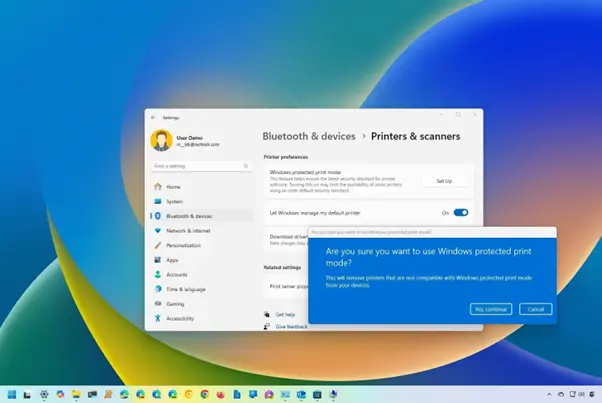
How to enable Windows Protected Print mode
Manufacturer Responsibilities and Tools
Printer manufacturers must adapt to the new architecture. They use the Partner Centre for driver validation. Microsoft provides tools for creating extension INF files. These files associate printers with specific Print Support Apps.
The move reduces the engineering burden for manufacturers. They no longer maintain thousands of unique driver packages. A single class driver covers multiple device models. This standardisation benefits the entire ecosystem.
Also Read: House GOP Moves Forward With Nationwide Voter ID and Citizenship Bill
Statistics and Market Context
Printers remain a primary source of technical support calls. Inconsistent drivers cause many system crashes. Microsoft tracks these failures through telemetry data. The move to a class driver aims to reduce these incidents.
The Mopria Alliance includes over 20 global manufacturers. These companies represent a large share of the market. Their support for IPP ensures broad compatibility. This collaboration drives the industry toward uniform standards.
Recommendations for Enterprise Administrators
IT departments must inventory their printing fleets. They should identify devices that lack IPP support. Administrators can deploy drivers via management tools like Intune. This bypasses the changes to Windows Update.
Testing remains vital for business-critical operations. Organisations should evaluate the class driver with their equipment. This ensures that features like stapling and hole-punching work. Print Support Apps fill the gap for advanced finishing options.
Final Outlook for Windows Printing
Microsoft concludes the era of custom driver distribution. The company prioritises stability and security for all users. This transition reflects trends in the mobile and cloud sectors. Apple and Linux already use similar printing models.
The phased approach gives stakeholders time to prepare. Users experience fewer installation hurdles over time. Windows printing becomes as simple as connecting a mouse. This modernisation secures the platform for future decades.